
Best phone cleaner app for Android
Updated: · By Ak
The best Android phone cleaner shows what is using your storage, lets you review it, and clears it with your say-so. That is CleanKoach.

 Coming soon
What to look for in a phone cleaner
Storage fills up for five reasons. A good cleaner targets each one.
- Big videos: a few files can outweigh thousands of small ones.
- Duplicates: the same file saved twice.
- Near-identical shots: bursts and retakes.
- Screenshots: years of them.
- Trash and app cache: leftovers that still take space.
Add compression, on-device privacy and a confirmation before anything is deleted.
Are phone cleaner apps safe? · How a phone storage cleaner works
Why CleanKoach is the best choice
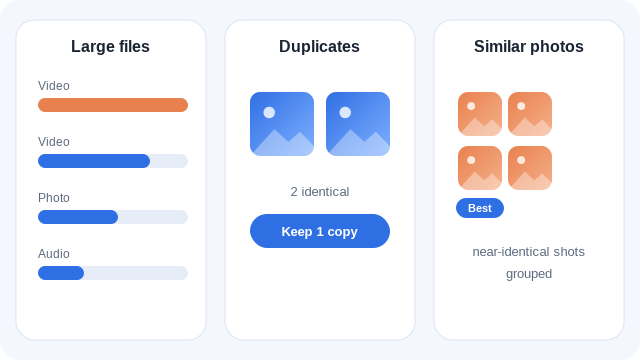
- Large files: biggest photos, videos and audio, sorted by size.
- Duplicates: identical files grouped, one copy kept, reclaimable space shown.
- Similar photos: near-identical shots grouped with the best one marked.
- Screenshots: every screenshot in a single pass.
- Photo and Video optimizer: compress what you keep and see the space saved.
- Activity Monitor, Wi-Fi Security, Network Speed: app usage for the last 24 hours, a connection safety check and a download speed test.
One tap Clean Up
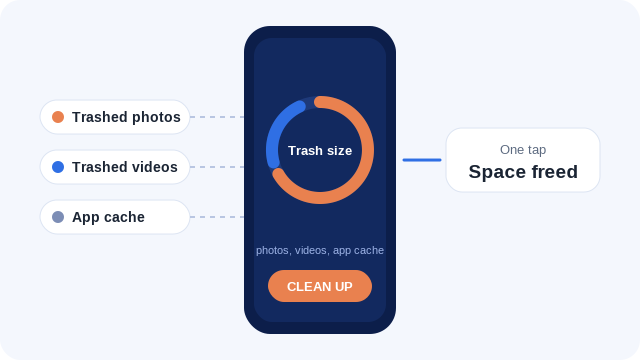
The ring on the home screen shows your trash size: trashed photos and videos plus CleanKoach's own cache. Tap Clean Up, watch the full-screen progress animation, and see exactly how much space you freed.
How to clean your Android phone
- Install CleanKoach from Google Play.
- Allow access to photos, videos and audio. Analysis happens on your phone.
- Tap Clean Up, or open Large files, Duplicates, Similar photos or Screenshots.
- Confirm on the Android prompt.
- Compress the rest with Photo optimizer and Video optimizer.
Manual cleanup vs CleanKoach
Android's own steps work, one category at a time. CleanKoach puts the same jobs in one app.
| Job | Manual on Android | With CleanKoach |
|---|---|---|
| See what uses space | Settings, Storage, then one category at a time | Storage used and trash size on the home screen |
| Find big files | Browse a category and pick files | Large files: biggest first, sorted by size |
| Remove duplicates | Spot and delete copies yourself | Duplicates: identical files grouped, one copy kept |
| Thin out burst shots | Review photos one by one | Similar photos: grouped, best shot marked |
| Clear screenshots | Find and select them in your gallery | Screenshots: every one in a single list |
| Shrink what you keep | Not part of Android's storage steps | Photo and Video optimizer show space saved |
| Clear trash | Trash in the gallery, cache in app settings | Clean Up clears trashed photos and videos and CleanKoach's own cache in one tap |
Compress instead of delete
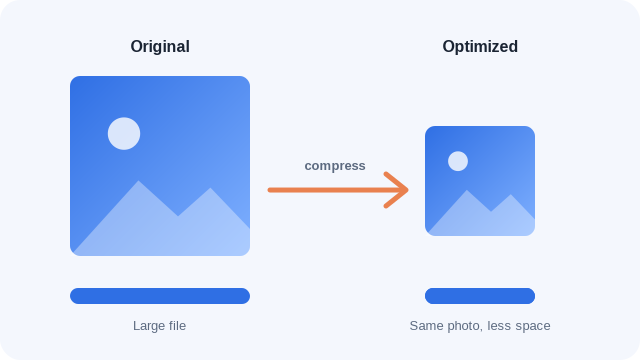
Photo optimizer and Video optimizer shrink the files you want to keep and show the space saved as they go.
How we judge a phone cleaner
| Criterion | What we look for | CleanKoach |
|---|---|---|
| Coverage | Large files, duplicates, similar photos, screenshots, trash | All five |
| Visibility | Sizes and totals shown before you act | Sizes on every list |
| Control | You choose and confirm what goes | Android confirms deletions |
| Compression | Shrink files instead of deleting | Photo and Video optimizer |
| Privacy | Analysis on the device, clear policy | On-device, nothing uploaded |
| Usability | Clear screens, your language, fair pricing | 44 languages, free with Pro to remove ads |
Private by design
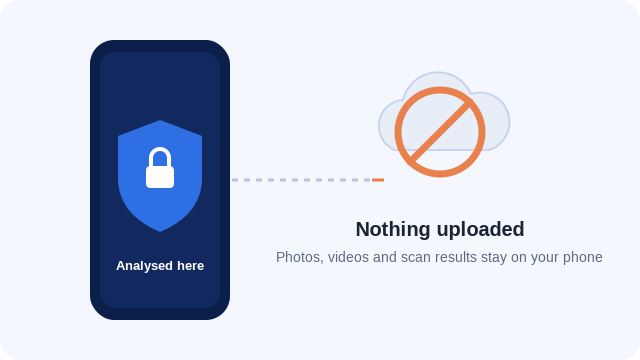
CleanKoach analyses your media on your phone. Your media, usage data and scan results are never uploaded. Usage Access is requested separately and only for Activity Monitor. See the privacy policy.
Get CleanKoach
Built for Android 9 and newer. Browse the features or the 44 languages, then install from Google Play.
Phone cleaner for iPhone · Phone charging port cleaner · Phone speaker cleaner · Phone screen cleaner · Phone cleaning kit
Frequently asked questions
What is the best phone cleaner app for Android?
CleanKoach. It covers every common storage hog: large files, duplicate files, similar photos, screenshots and trash, and it adds photo and video compression, all analysed on your phone.
Is CleanKoach free?
Yes. CleanKoach is free to use with ads on the home screen. Pro removes the ads.
Does CleanKoach upload my photos or files?
No. Files are analysed on your device. Your media, usage data and scan results are never uploaded.
Which Android versions does CleanKoach support?
Android 9 and newer.
How does CleanKoach find duplicate photos?
The Duplicates tool finds identical photos, videos and audio files, groups them, keeps one copy and shows how much space you can reclaim.
What are similar photos?
Near-identical shots such as burst photos, retakes and slightly different angles. CleanKoach groups them and marks the best one so you can keep it and clear the rest.
Can CleanKoach compress photos and videos?
Yes. Photo optimizer and Video optimizer compress your photos and videos and show how much space you saved.
Will CleanKoach delete my files without asking?
No. You choose what to remove, and Android asks you to confirm before media is deleted.
What does the Clean Up button do?
It clears your trash size, which is trashed photos and videos plus CleanKoach's own cache, and then shows how much space you freed.
What is Activity Monitor and why does it need Usage Access?
Activity Monitor shows which apps you opened, how many times and for how long over the last 24 hours. Android requires Usage Access for that. The data stays on your device.
Does CleanKoach check Wi-Fi safety?
Yes. Wi-Fi Security checks your connection for SSL stripping and interception.
Can I test my internet speed in CleanKoach?
Yes. Network Speed measures your download speed.
Which languages does CleanKoach support?
44 languages, including English, Spanish, Portuguese, French, German, Hindi, Arabic, Japanese, Korean, Gujarati and Malayalam. Choose yours in Settings.
How do I remove ads from CleanKoach?
Upgrade to Pro. Pro removes the ads.
What permissions does CleanKoach ask for?
Access to your photos, videos and audio so it can find large files and duplicates, and Usage Access only if you turn on Activity Monitor. Notifications are only requested if you switch reminders on.
Get CleanKoach
Free for Android.
Coming soonSources
- Free up storage on your Android device, Android Help. Google's own steps for checking storage, moving photos and videos to Trash and clearing app cache.
- User Data policy, Google Play Console Help. Google Play requires apps to show an in-app disclosure before requesting runtime permissions.